
Channel strip
Channel
Raw take in.
Finished track out.
Cleanup, timing, tuning, two EQs, analog color, two compressors, tape and a final limiter, in signal-flow order. Plus capture-based fixes: align doubles, tighten takes to the grid, and correct pitch note by note.
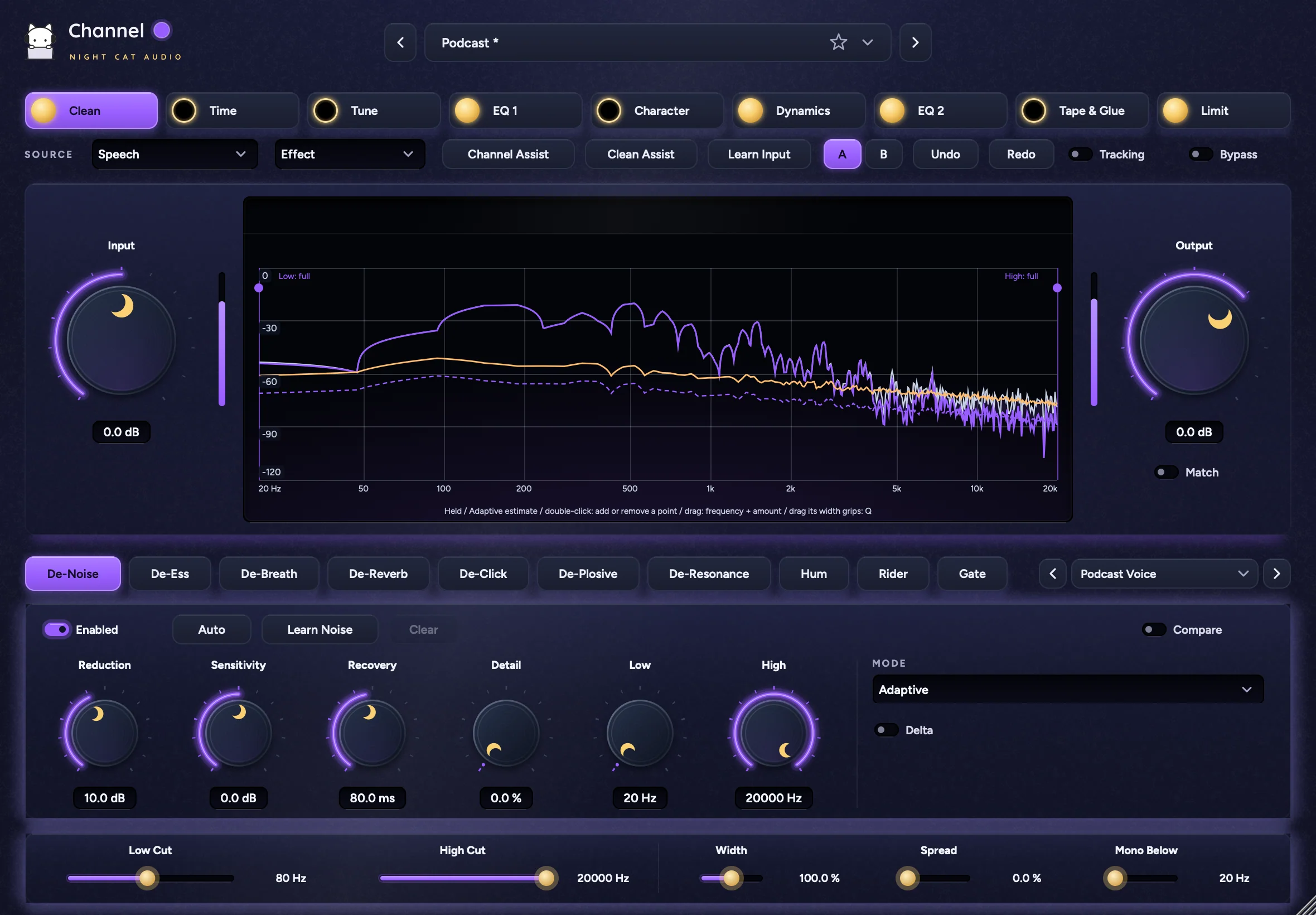
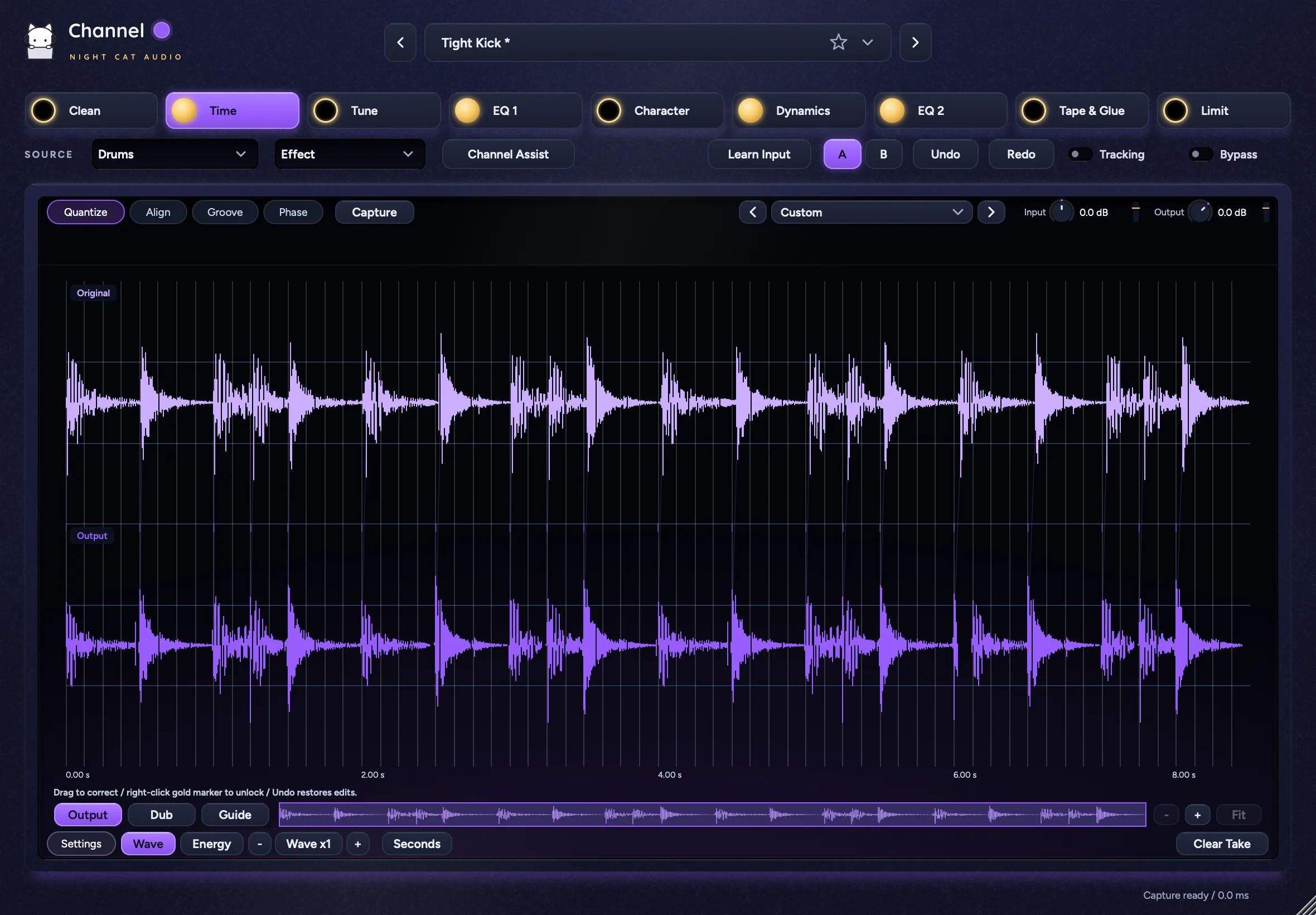
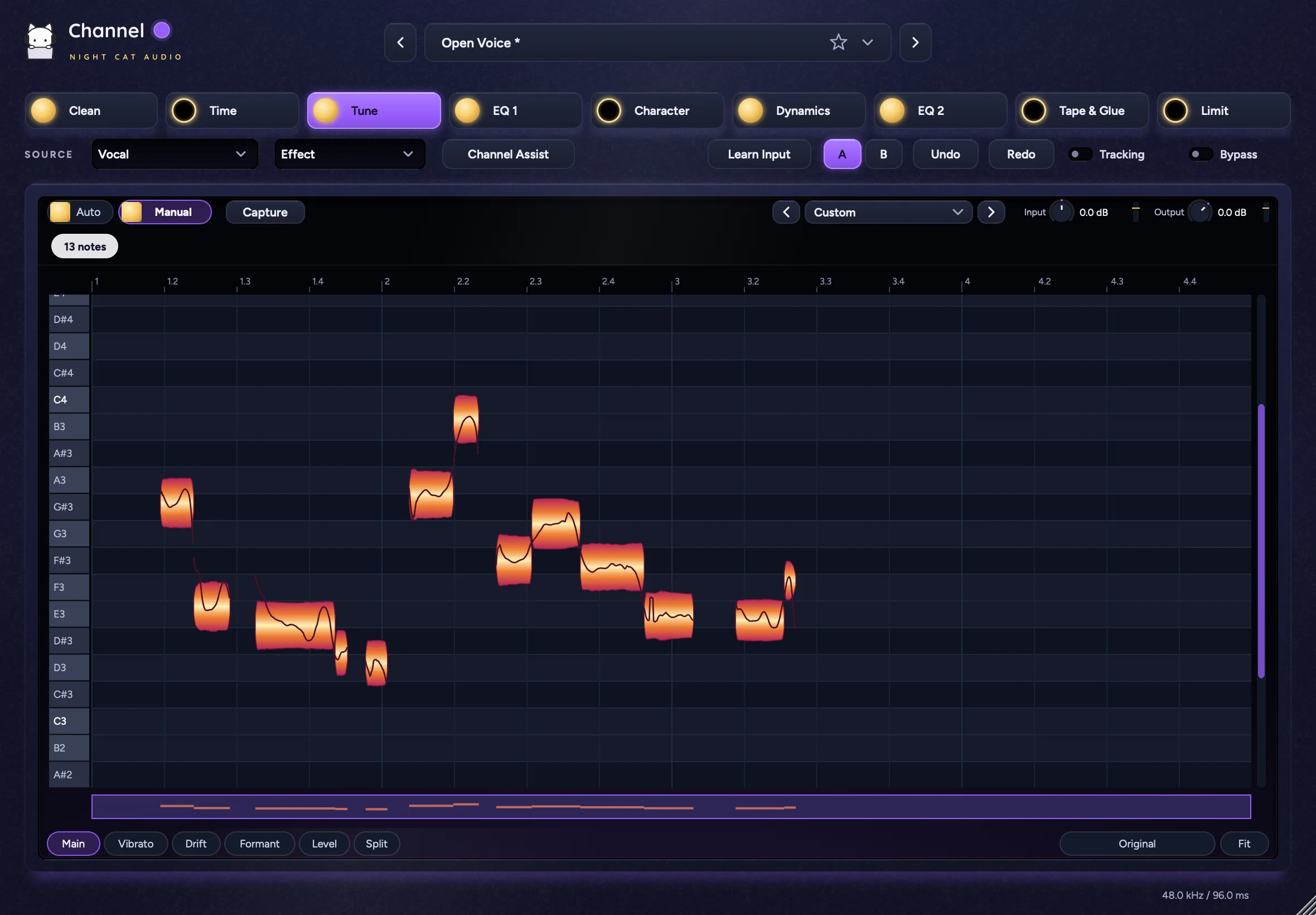
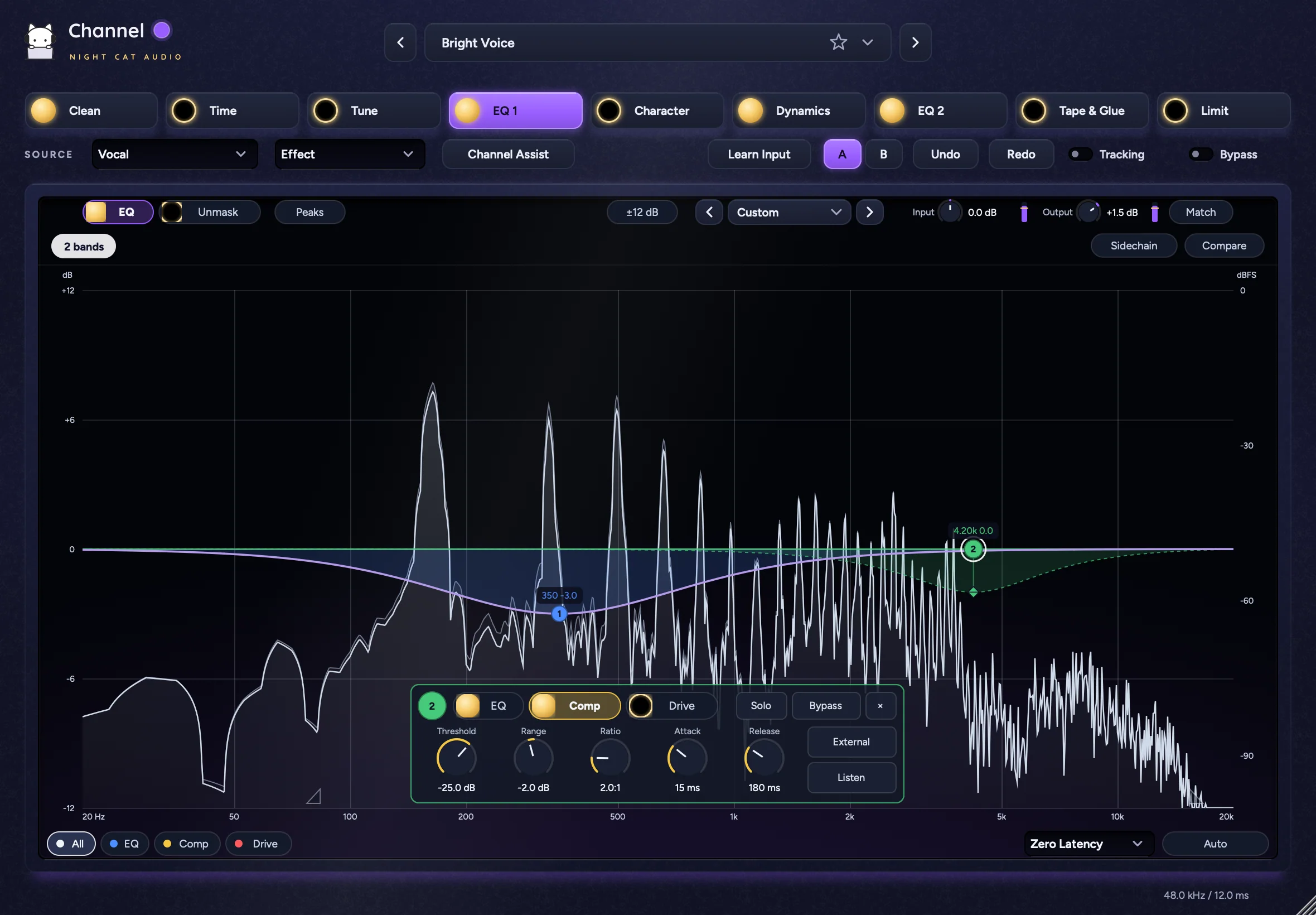
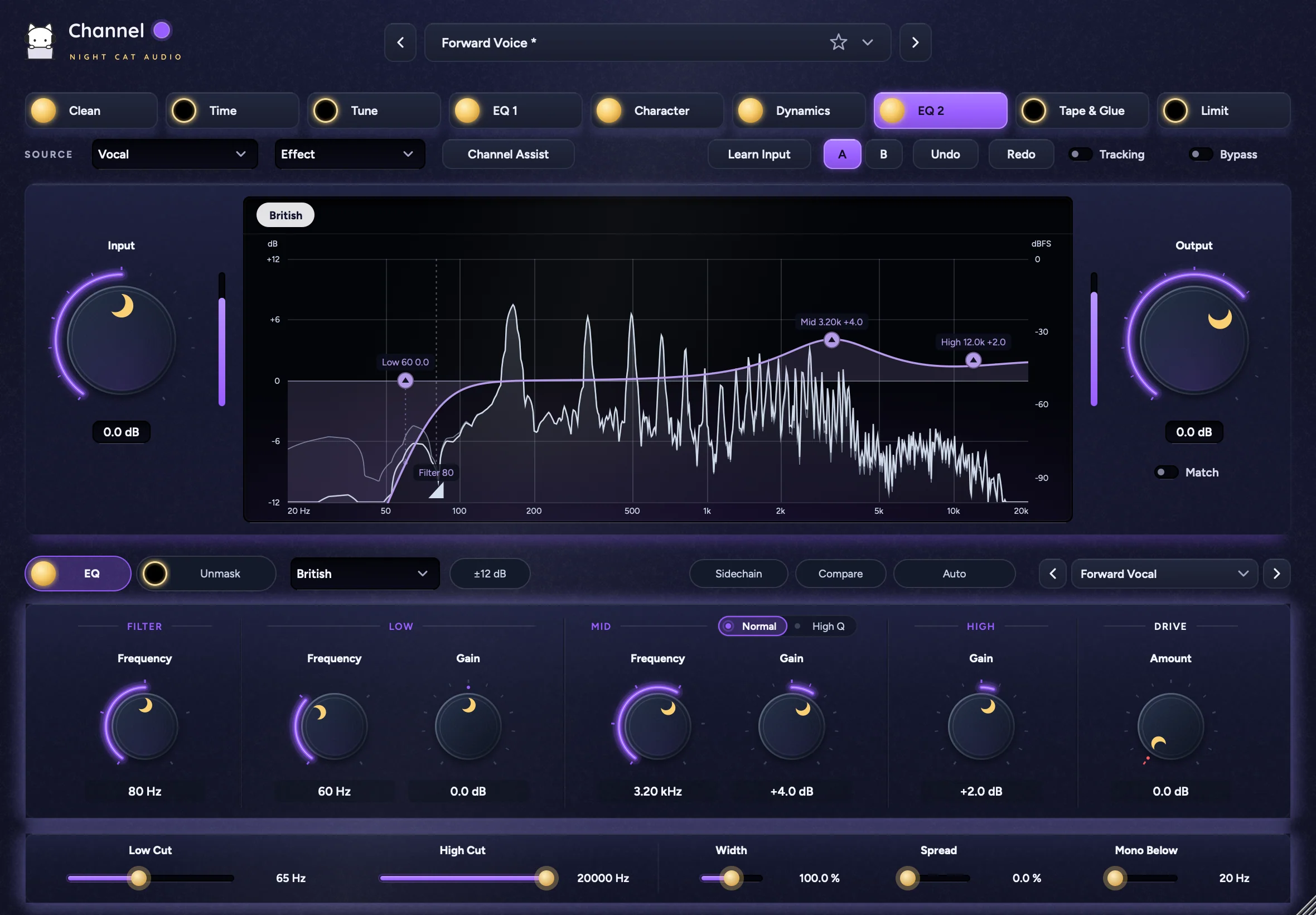
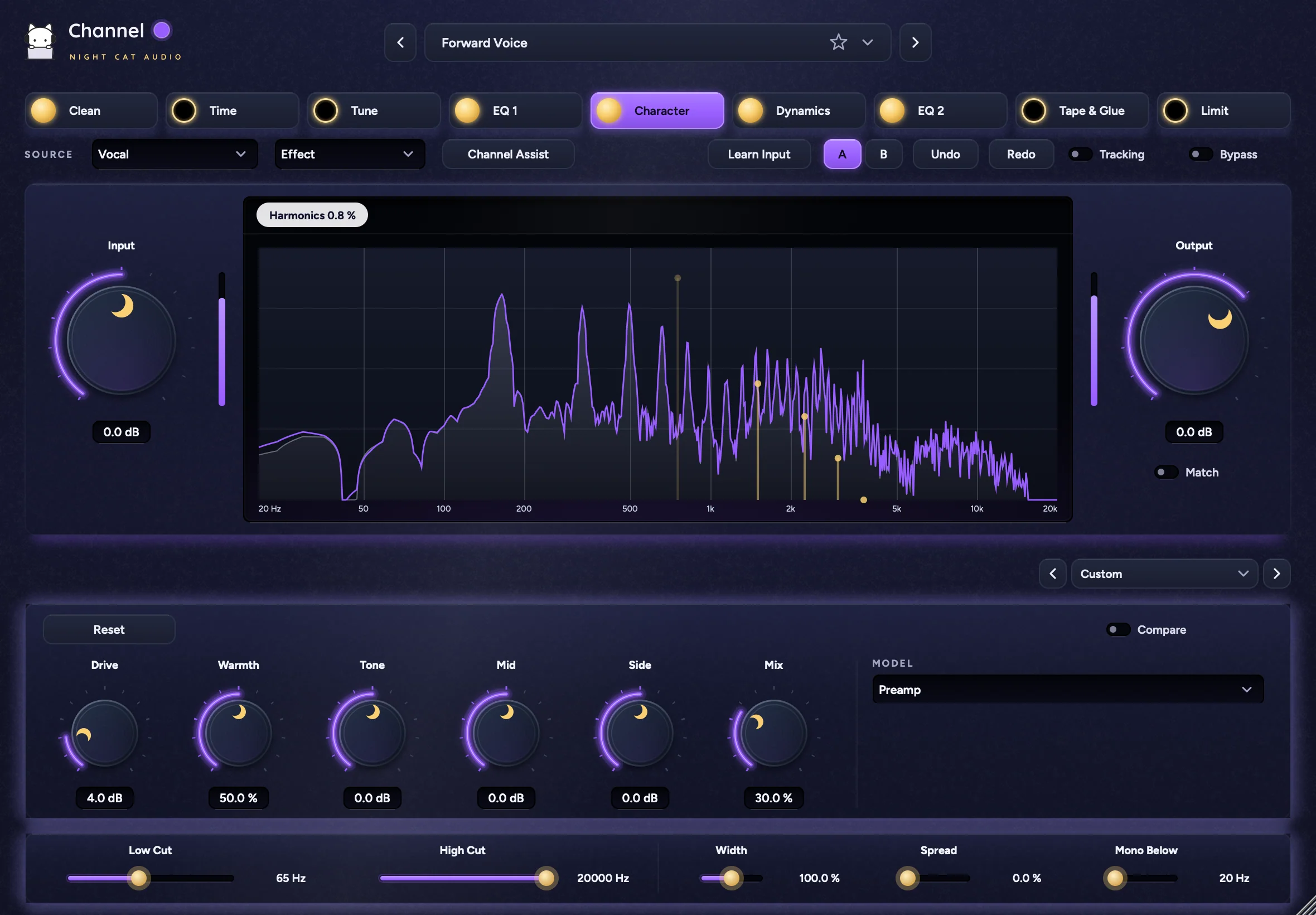
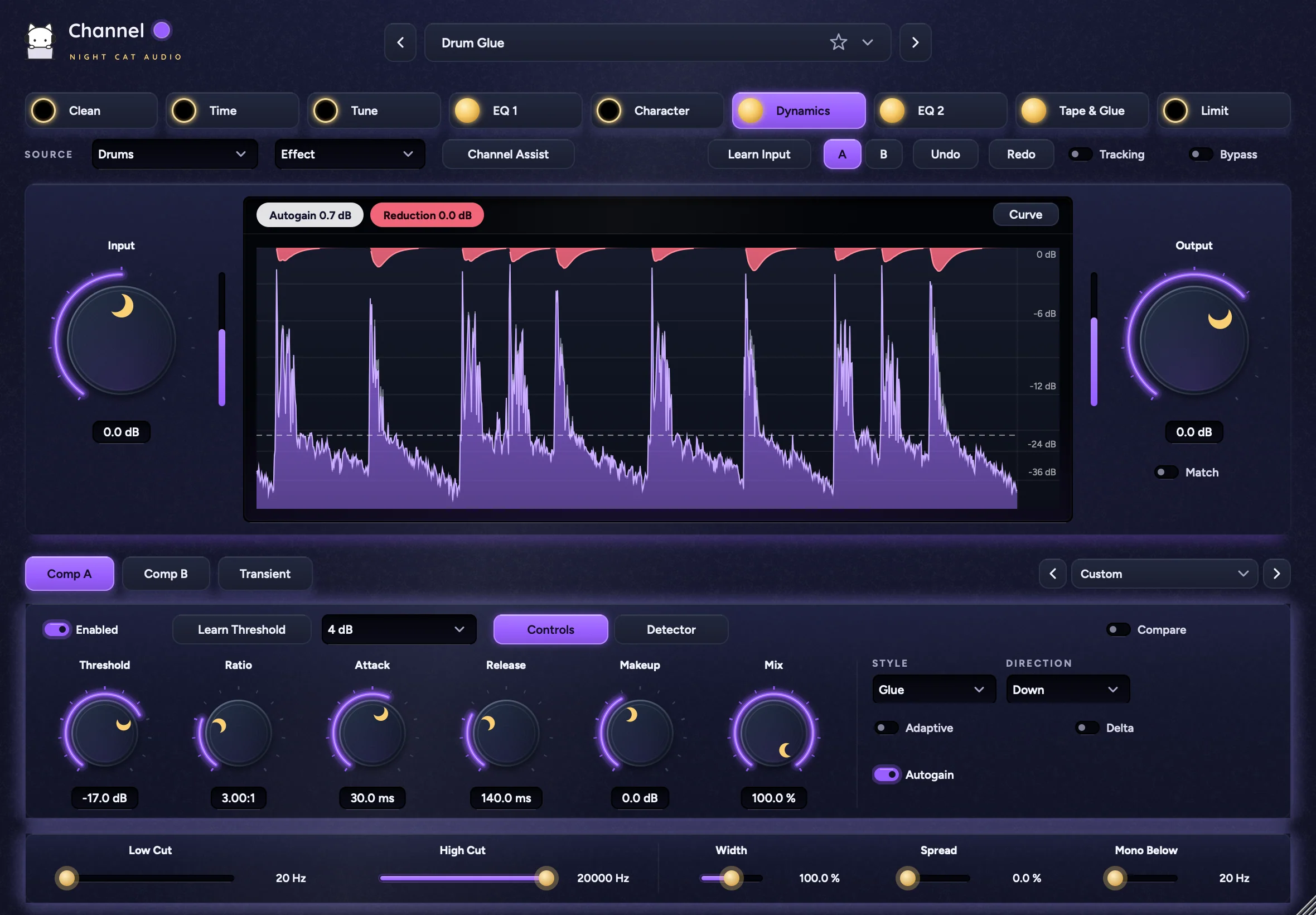
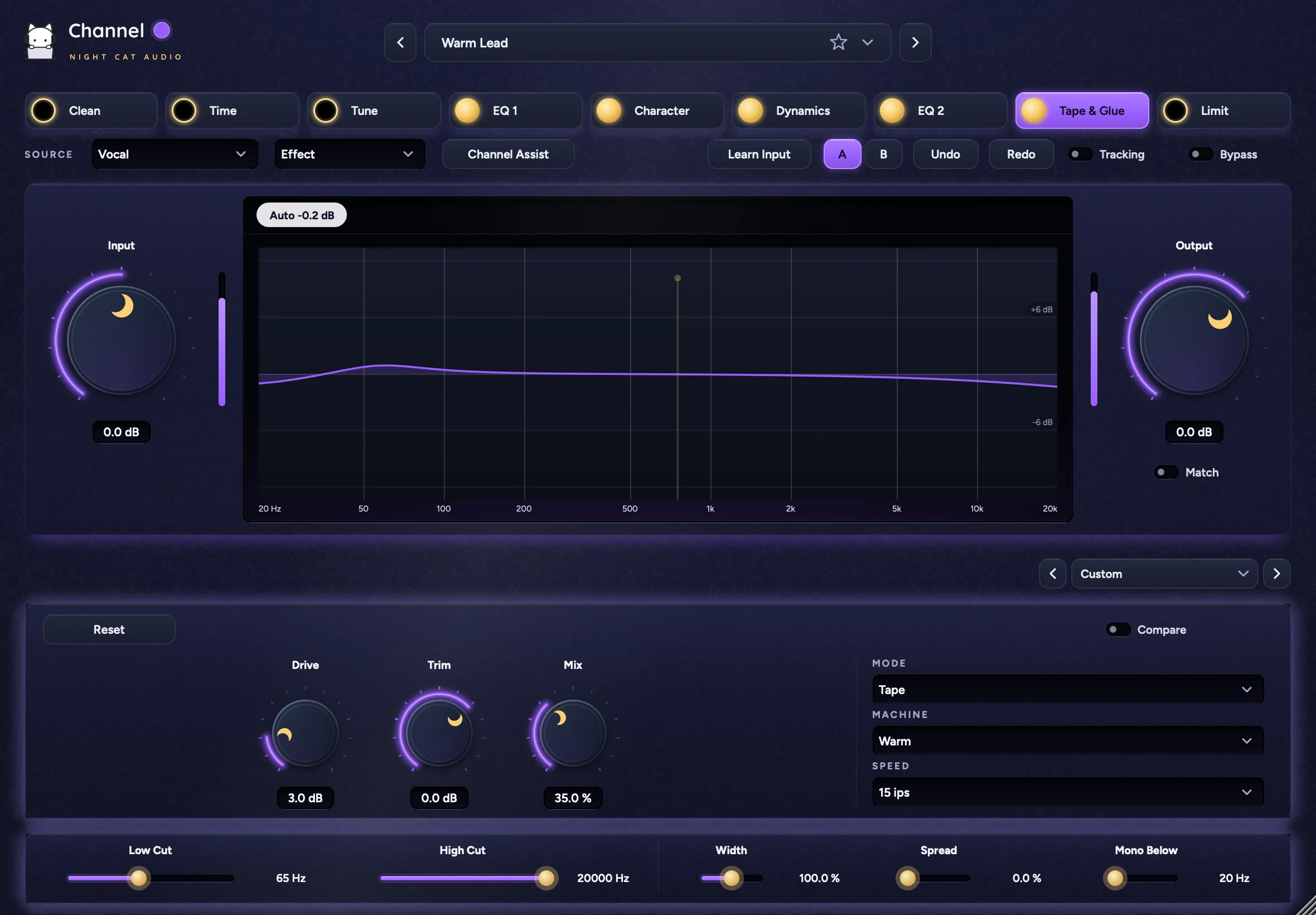
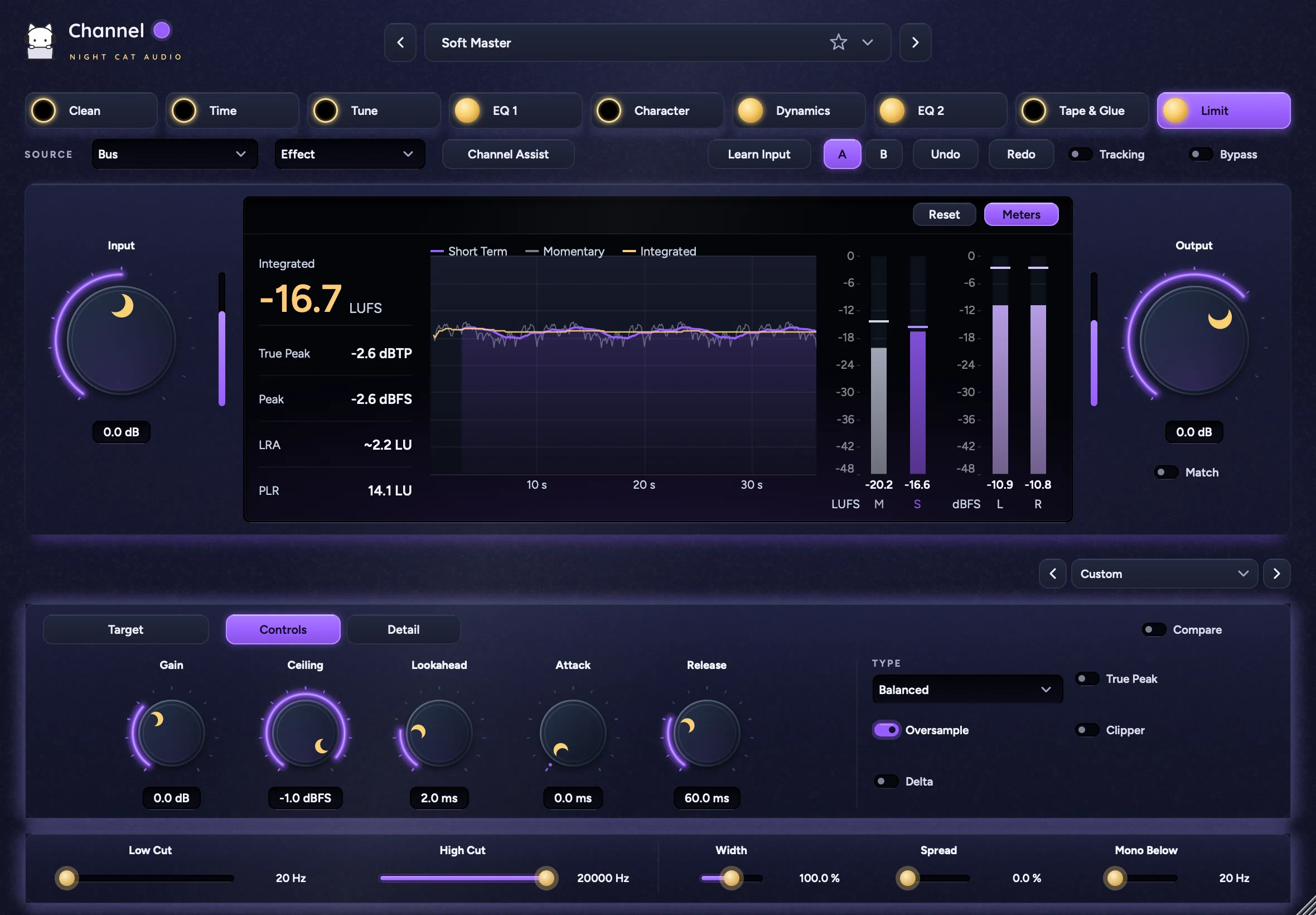
One strip, every stage
Clean, Time, Tune, EQ 1, Character, Dynamics, EQ 2, Tape & Glue and Limit run left to right in one plug-in. Each stage has its own page, power switch and presets.
A starting point in seconds
Pick a Source, click Channel Assist and play about eight seconds. Channel sets input level, cleanup, a low cut, corrective EQ cuts and compression in one undo step.
Fix the take, not just the tone
De-Reverb, De-Click, De-Breath, Rider, Time and Tune Manual work on a captured passage. Click Capture, play, stop, and the result plays back in place.
Check every move
Delta plays only what an effect removes, and Compare plays its input at matched loudness. A / B and Match let you judge whole setups at equal level.
Features
Main controlsStage row, Source, monitor views, Input and Output
- Stages
- Clean, Time, Tune, EQ 1, Character, Dynamics, EQ 2, Tape & Glue, Limit, each with a moon power switch
- Control row
- Source (Vocal, Speech, Drums, Bass, Guitar, Keys, Instrument, Bus), monitor menu (Effect, Spectrum, Loudness, Stereo), Channel Assist, Learn Input, A / B, Undo, Redo, Tracking, Bypass
- Levels
- Input and Output with meters, Match; a compact Input / Output pair on the full-height pages
- Status strip
- Reduction, Harmonics, Auto gain and band count pills, clip warnings, engine status
- Loudness view
- History (10 s, 30 s, 60 s), Measurement (Always, Playing, Reset), Pause, Reset
- On many effects
- Enabled, Delta, Compare, Audition, Controls / Detector views
AssistantsChannel Assist, Clean Assist and Auto on every Clean effect
- Channel Assist
- Input, Clean effects, Low Cut, up to two corrective EQ 1 cuts, Comp A, and Limit as a safety ceiling on a Bus; Undo Assist, Dismiss
- Clean Assist
- Input plus De-Noise, De-Ess, De-Breath, De-Plosive, De-Resonance, Hum and Rider, set from about eight seconds of audio
- Auto
- On every Clean effect: Auto, Amount (0–150 %), Undo, Dismiss, with the finding marked on the graph
CleanDe-Noise, De-Ess, De-Breath, De-Reverb, De-Click, De-Plosive, De-Resonance, Hum, Rider, Gate
- De-Noise
- Learn Noise, Finish, Cancel, Clear, Mode (Learned, Adaptive), Reduction, Sensitivity, Recovery, Detail, Low, High, Reset Curve, up to six reduction points in the graph
- De-Ess
- Frequency, Threshold, Depth, Balance, Mode (Split, Wideband), Mid, Delta, Audition
- De-Breath
- Detector (Live, Capture), Reduction, Sensitivity, Ceiling, Floor, Length, Fade, Start, End
- De-Reverb
- Capture, Amount, Strength, Tone, Start, End
- De-Click
- Capture, Detect (Impulse, Mouth), Sensitivity, Width, Amount, Start, End, step through repairs, Keep Original, Use Repair
- De-Plosive
- Sensitivity, Reduction, Frequency
- De-Resonance
- Aim (Spread, Bell), Depth, Sharpness, Selectivity, Speed, Low, High, Solo
- Hum
- Learn Hum, Cancel, Apply, Mains (50 Hz, 60 Hz), Fine, Track, Harmonics, Width, Depth
- Rider
- Mode (Live, Whole Take), Match, Target, Range, Speed, Auto Floor, Floor, Start, End
- Gate
- Mode (Standard, Drum), Threshold, Ratio, Range, Attack, Release, Low Cut; Drum: Ring, Bleed, Ghost; Detector: Knee, Hold, Hysteresis, Detection (Peak, RMS), External
TimeQuantize, Align, Groove, Phase on a captured take
- Capture
- Capture, Output / Dub / Guide audition, Wave, Energy, Pitch, waveform size, Seconds / Samples, zoom, Fit, overview, Clear Take, draggable markers
- Quantize
- Strength, Movement, Grid (1/4 to 1/32, 1/8T, 1/16T), Swing, Feel, Sensitivity, Material (Drums, Voice, Sustained)
- Align
- Task... (Double, Tight Double, Harmony, Tight Harmony, Dialogue, Instrument); Timing: Strength, Tolerance, Movement, Flexibility, Basis, Search, Material, Pitch, Gaps; Pitch: Amount, Tolerance, Limit, Speed, Detail, Target, Guide and Dub ranges, Fixed, Note; Voice: Transpose, Formants, Shift; Sync and Protect strips, warp markers and locks
- Groove
- Strength, Movement, Sensitivity, Grid, Pattern (1–8 beats), Material
- Phase
- Timing: Offset, Start, End, Invert; Filters: Type 1 / 2, Freq 1 / 2, Q 1 / 2, Reverse 1 / 2; Handles
TuneAuto and Manual pitch correction
- Auto
- Speed, Amount, Humanize, Stabilize, Reference, Hard, Key, Scale, MIDI, Learn Key, Finish, Cancel, Apply, Alternative, clickable key map with protected keys
- Manual
- Capture (or From Time), note editor; tools: Main, Vibrato, Drift, Formant, Level, Split; Scale panel: Key, Scale, Snap, Center, Drift, Reference; Fit; Glue, Restore Original, Select Special, Select All, Lost Edits
EQ 1 and EQ 2Two 8-band EQs edited on the graph, with Comp and Drive bands and Unmask
- Bands
- Up to 8 bands; Shape (Bell, Low Shelf, High Shelf, Low Cut, High Cut), Channels (Stereo, Mid, Side), Frequency, Gain, Q, Slope; Solo, Bypass, ×
- Band types (EQ 1)
- EQ, Comp (Threshold, Range, Ratio, Attack, Release, External, Listen) and Drive (Type: Preamp, Console; Amount, Mix, Output), in any combination; view filter All / EQ / Comp / Drive
- Top and bottom bars
- EQ / Unmask, Peaks, Range (±6, ±12, ±24 dB), Processing (Zero Latency, Linear Phase), Sidechain, Compare, Auto
- Filters
- Low Cut and High Cut: Frequency, Slope (6–48 dB/oct), Channels, Bypass
- Unmask
- Amount, Depth, Low, High, Attack, Release, Precision, Trim, Channels, Freeze, Listen (Off, Sidechain, Removed)
CharacterAnalog-style color with a harmonics display
- Color
- Model (Preamp, Console, Transformer), Drive, Warmth, Tone, Mid, Side, Mix, Reset, Compare
DynamicsComp A, Comp B and Transient
- Comp A and Comp B
- Threshold, Ratio, Attack, Release, Makeup, Mix, Style (Clean, Smooth, Punchy, Glue), Direction (Down, Up), Adaptive, Autogain, Learn Threshold, Curve
- Detector
- Knee, Lookahead, Hold, Range, Low Cut, High Cut, Sidechain, Link, Channels, Oversampling (Off, 2x, 4x), External, Audition
- Transient
- Attack, Sustain, Length, Recovery (Balanced, Fast, Relaxed), Contour (Natural, Tight, Smooth)
EQ 2 modelsDigital or four hardware-style tone EQs
- Model
- Digital, Tube, British, American, Air; each keeps its own settings
- Tube
- Low (Frequency, Boost, Atten), High (Frequency, Boost, Width), Top (Frequency, Atten), Drive
- British
- Filter, Low, Mid (Normal / High Q), High, Drive
- American
- Low, Low Mid, High Mid, High (Bell / Shelf), Filter (Band Pass In / Out), Drive
- Air
- 10 Hz, 40 Hz, 160 Hz, 650 Hz, 2.5 kHz, Air (Frequency, Gain), Drive
Tape & GlueTape, Tube or Console
- Tape & Glue
- Mode (Tape, Tube, Console), Machine (Clean, Warm, Vintage), Speed (15 ips, 30 ips), Drive, Trim, Mix, Reset, Compare
LimitFinal peak limiter with loudness meters
- Controls
- Gain, Ceiling, Lookahead, Attack, Release, Type (Clean, Balanced, Punchy, Loud), True Peak, Oversample, Clipper, Clip, Shape (Hard, Soft, Analog)
- Detail
- Peak Link, Release Link
- Target
- Off, LUFS or dB, value, Learn
- Meters
- Integrated, True Peak, Peak, LRA, PLR, loudness history, M, S, L and R bars, Reset
Slider stripFilters and stereo along the bottom
- Filters
- Low Cut (20–500 Hz), High Cut (2–20 kHz)
- Stereo
- Width (0–200 %), Spread (0–100 %), Mono Below
Workflow64 presets, stage presets, A / B, undo, MIDI learn, resizable window
- Presets
- 64 factory presets under Vocals, Speech, Guitar, Keys, Bass, Drums, Mix Bus; User, Favorites, Save, Save As…, Delete, Browse All…, Lock Output; star; < and >
- Browse All
- Sound / Instrument, All, Factory, User, Favorites, Search, Add / Remove Favorite, Import..., Folder
- Stage presets
- A preset field on every stage: factory list, User, Save, Save As…, Delete, Reset; extra presets for each EQ 2 model
- Compare
- A / B, Match, Lock Output
- Editing
- Undo, Redo, double-click to reset, click a value to type it, tooltips
- Automation
- Every control automatable, Learn MIDI CC, Clear MIDI mapping
- Latency
- Tracking for zero-latency monitoring, latency shown in the footer
- Window
- Theme color per instance (Purple, Indigo, Sky, Cyan, Teal, Mint, Lime, Pink, Lilac or any color), resizable from 708 × 492 to 1770 × 1230